Ads
8 min read
Your Pixel Is Teaching Meta to Find Tire-Kickers. Here's the Fix.
Send Meta the wrong conversion data and the algorithm gets very good at finding the wrong people. Here's the combined pixel + CAPI setup that fixes lead quality without touching your creative or targeting.

The data you send back to Meta determines who Meta finds for you. Send it the wrong data and the algorithm becomes very good at finding the wrong people — fast.
We recently came across a SaaS account with a $30 cost per lead and 70% unqualified calls. Three months after fixing their tracking setup: a $230 cost per lead, with ROI roughly tripled. Here’s what changed.
The Two Signals Meta Uses
Meta gives you two ways to report conversions. The frontend web pixel fires on your page — a prospect hits the confirmation page after booking, the pixel triggers, and Meta logs a conversion. Data comes in fast and it’s easy to install on a Framer build, a GHL page, or a Calendly confirmation. That speed is the appeal. But speed doesn’t mean accuracy.
The Conversions API (CAPI) is backend. Instead of a page-level event, you push conversion data to Meta from inside your CRM or sales pipeline. Sales qualifies a lead on the call? Fire a CAPI event. Sales closes? Fire another. Now Meta receives data from inside your sales process — not just from who clicked a booking link. That distinction matters more than most advertisers running B2B offers have ever had to think about.
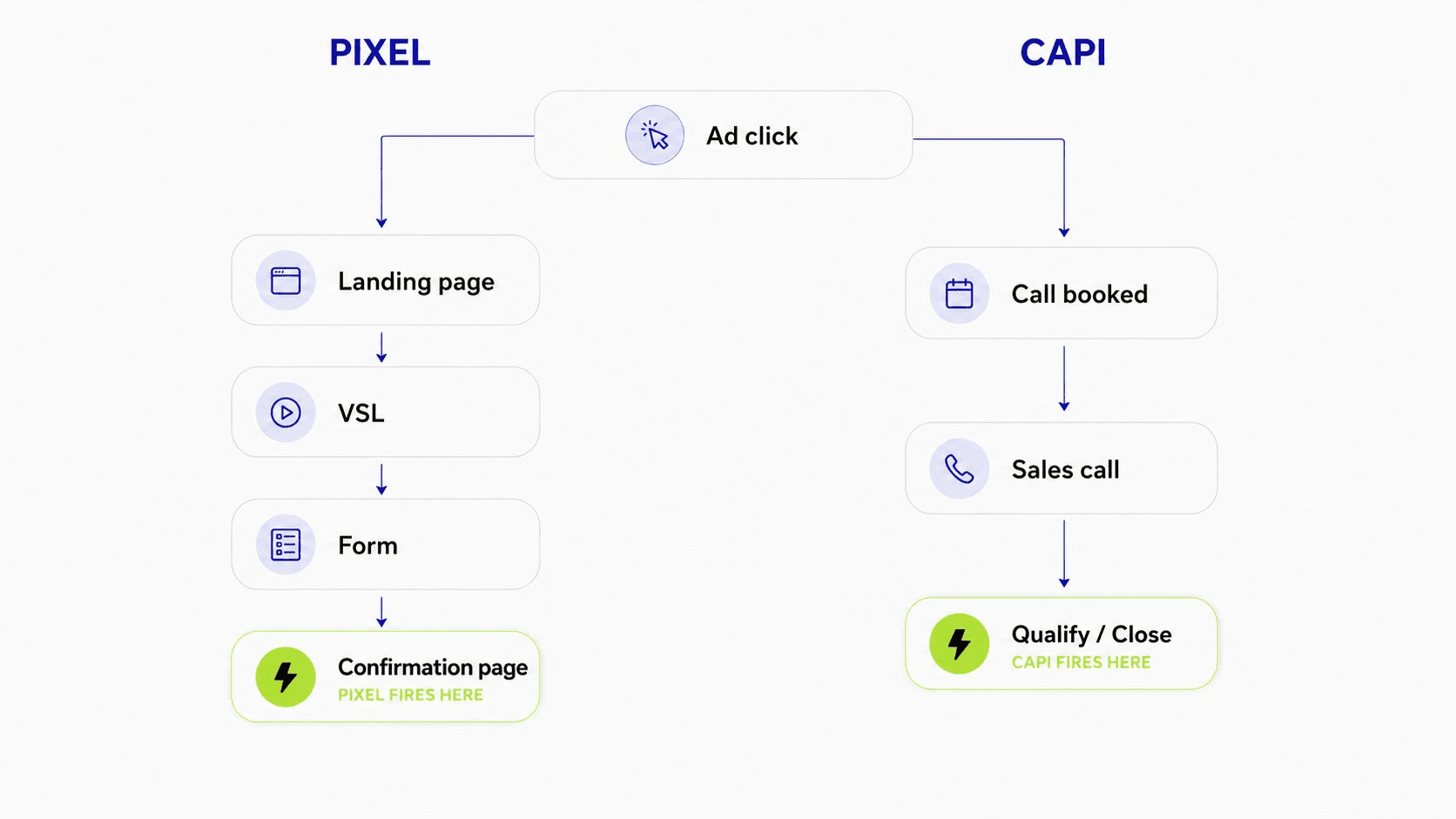
The Pixel-Only Trap
When you fire the pixel on every booking, Meta sees a success and starts looking for more people like whoever booked. Over time the pixel builds a detailed model of “the type of person who books a call on this page.” That’s not the audience you want. You want the type of person who shows up, has budget, is the decision-maker, and closes.
Booking a call is a low-friction action — the barrier is clicking a button, and the people who do that skew much broader than your actual buyer pool. The account with the $30 cost per lead had strong volume, but 70% of those calls had no real budget, no urgency, and often weren’t even the decision-maker. The creative wasn’t the issue. The offer wasn’t the issue. Every unqualified booking had been teaching Meta who to target — and Meta listened perfectly.
Why CAPI Alone Kills New Campaigns
The obvious fix seems to be: skip the pixel, use CAPI only. Don’t. CAPI requires your sales team to run real conversations before any data fires back. On a new campaign that lag is brutal — prospect books, the call happens three to five days later, sales qualifies, then CAPI fires. That’s nearly a week per data point.
Meta’s algorithm needs volume to optimise — roughly 20+ conversion events per week before performance stabilises. When CAPI is the only signal and your team runs a handful of calls a day, you’re nowhere near that threshold for weeks. The pixel starves, and the campaign dies before it learns anything useful.
The Combined Setup
The actual approach: run both, but control what touches the pixel. The pixel fires on the confirmation page — but only when a qualified lead books. Not every booking; qualified bookings only. To make this work, put a filter before the confirmation page: a two-question qualifier in the booking flow.
“Are you the decision-maker for this purchase?”
“Is your monthly ad budget (or revenue, or deal size) at least [your minimum]?”
If either answer is no, the prospect doesn’t reach the confirmation page — they’re redirected to a different path (a lower-ticket offer, a free resource, a community, a nurture sequence). They don’t see the pixel fire and they don’t train your algorithm. If both answers are yes, they hit the confirmation page, the pixel fires, and Meta logs a qualified lead. Meanwhile, CAPI fires whenever the sales team qualifies or closes someone on the call. The pixel provides fast data; CAPI provides accurate data. You’re not choosing between speed and quality — you’re getting both.
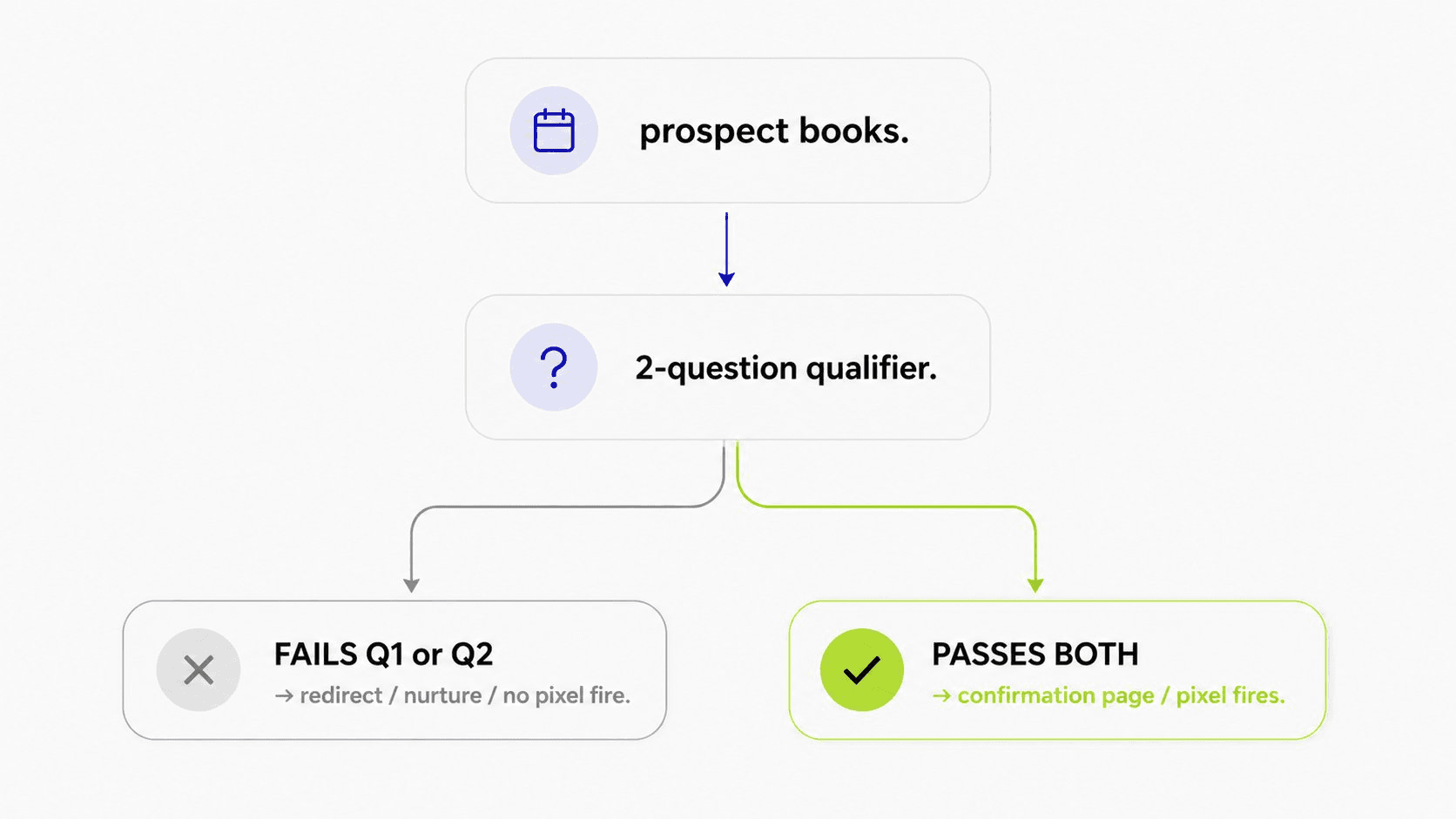
Pixel Conditioning
What you feed the pixel is what Meta becomes good at finding. That’s the principle behind pixel conditioning, and it’s the highest-leverage thing you can do to improve lead quality without touching your creative or targeting. Run the split-funnel architecture for a few weeks and the algorithm sharpens — the pixel now has a clean dataset of people who had budget, authority, and intent when they booked. CPMs may rise slightly as the audience narrows, but show rate, qualified rate, and close rate improve in ways that more than compensate. The math shifts from “cheap leads, terrible pipeline” to “expensive leads, clean pipeline” — and net ROAS is the only metric that actually matters.
The Endgame: CAPI Only
Once CAPI is consistently generating 20+ qualified events per week, the algorithm knows what your buyers look like and no longer needs the page-level pixel for training. Pull the pixel conversion event off the confirmation page and let CAPI be the only signal. Now the algorithm isn’t finding “people who book” — it’s finding “people who close.” Cost per lead will rise when you make this switch; that’s expected, because the audience narrows again. But higher CPL comes with higher show rate, higher close rate, and higher cash collected per deal.
The account that rebuilt its tracking this way — qualifier on the booking page, filtered pixel, backend CAPI on qualifications and closes — was at a $230 cost per lead three months later, with ROI roughly tripled. The $30 lead was the expensive mistake; the $230 lead was the profitable one.
The Full Sequence
Stage 1 (roughly weeks 1–6): pixel fires only on qualified bookings; CAPI fires on qualify and close; disqualified leads route to a nurture path with zero Meta signal. Let the algorithm collect data across the full sales cycle before major decisions.
Stage 2 (week 6+, once CAPI hits 20+ events/week): pull the pixel off the confirmation page, run CAPI only, and let Meta find buyers instead of bookers.
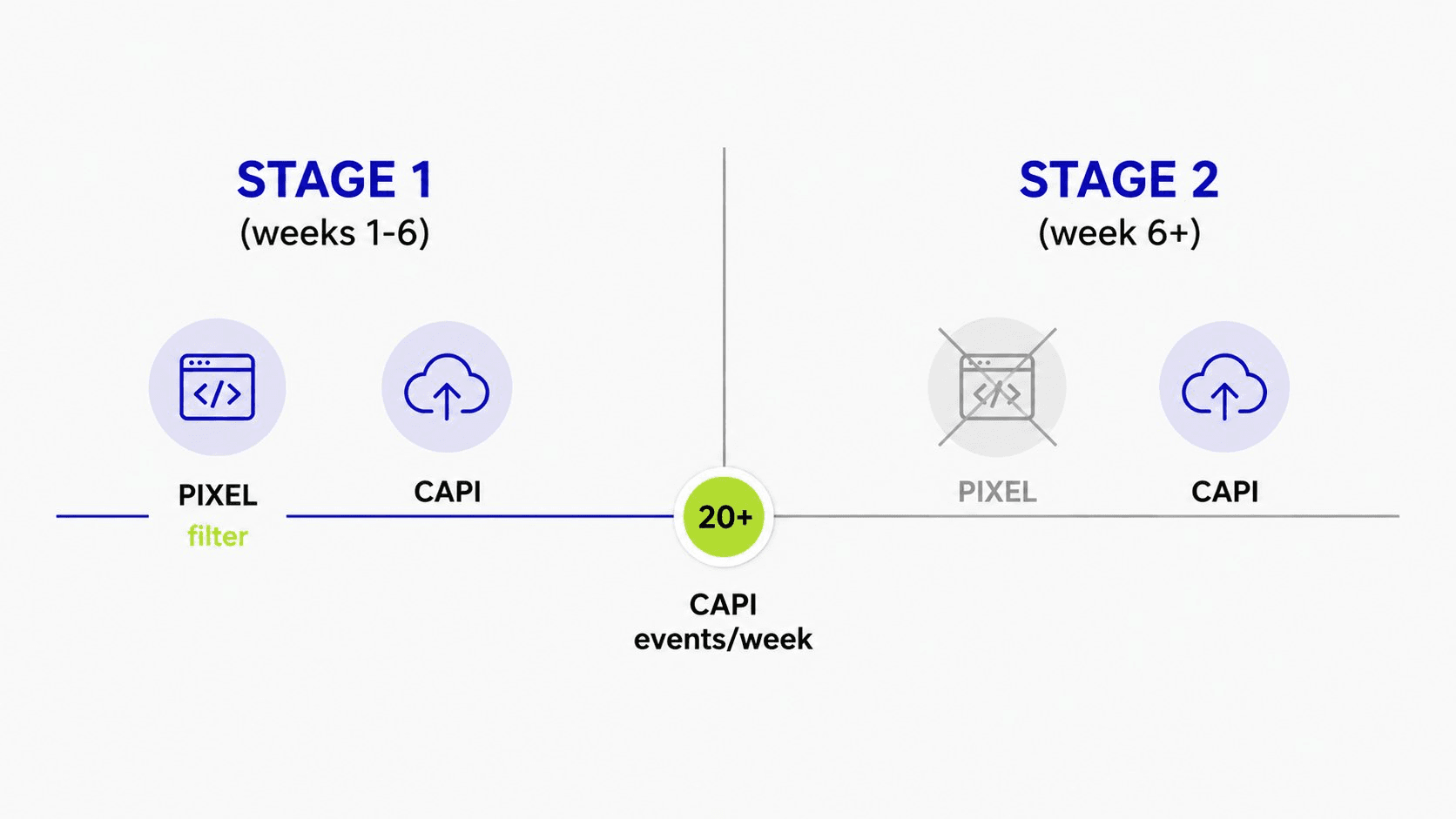
The technical build — a Framer (or GHL / ClickFunnels) confirmation page, a custom qualification form with branching logic, and CAPI via your CRM — takes about a day to wire correctly. The discipline to keep it filtered takes longer to maintain. But if lead quality is killing your close rate and burning out your sales team, this is the lever. Fix the signal; the algorithm does the rest.
Want this built end-to-end? Book a call and we’ll set up the tracking with you.
Want this built for your offer?
We build done-for-you cold-traffic funnels for B2B agencies — landing page, VSL, ads, and nurture in 14 days.
Book a free call